

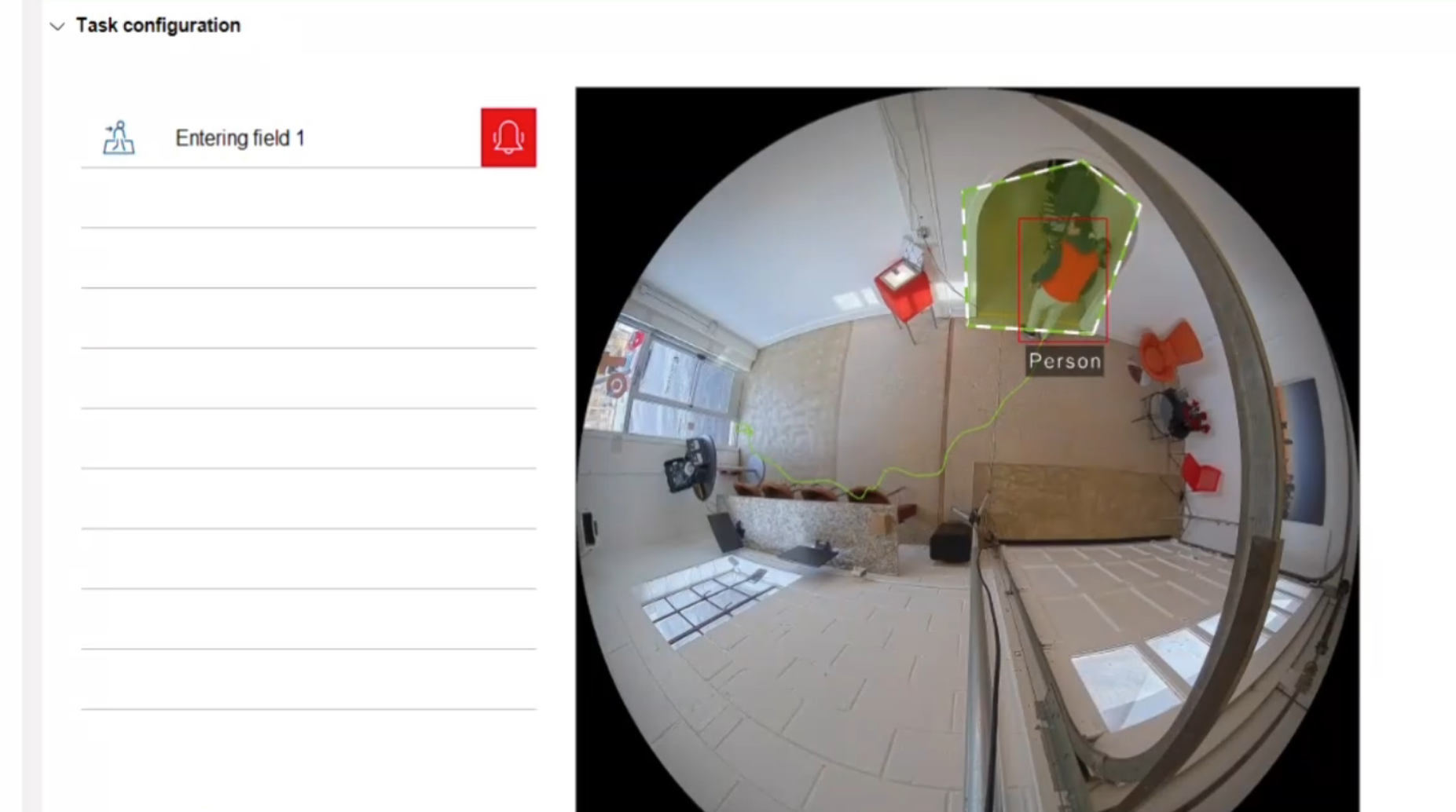
Imagine a delivery driver arrives at 7:30 p.m. Your facility is closed, lights are off, and no one is on-site to accept packages. You still want deliveries to happen, but you do not want an unattended driver wandering into inventory aisles, offices, cages, or other restricted areas—especially in a building where the receiving area is open to the rest of the space and there is no physical door separating “dock” from “work area.”
A practical approach is to create a designated receiving zone that can be temporarily accessed, while the remainder of the building stays protected. In this demonstration scenario with Sam Roppolo, Caleb Hoover, and Brad Castillo, that’s accomplished by linking Radionix intrusion and IQSIGHT video analytics (both formerly Bosch) so the building enforces a “virtual boundary” and responds immediately when someone crosses it.
The Core Idea
Allow access to the receiving area only, and treat movement beyond that zone as an alarm condition—even without a physical partition.
This is done by integrating:
-
A Bosch intrusion control panel (G Series or B Series)
-
Bosch IP cameras with analytics (IVA / IVA Pro) to define “allowed” and “restricted” zones
-
An optional Bosch IP horn speaker for audible intervention (or keypad annunciation, text, email, etc.)
In Bosch’s published specifications for the B9512G, the panel can integrate directly with Bosch IP cameras and use them as supervised points/outputs, which is the foundational concept behind using camera events as security system logic.
Why This Matters for Facility and Asset/Inventory Protection
Unattended deliveries create a predictable risk pattern:
-
Curiosity drift: a driver steps “just a few feet” beyond the dock to look around
-
Opportunity risk: restricted inventory or controlled items become accessible
-
Accountability gaps: without structured controls, it becomes difficult to prove where someone went and when
A virtual receiving boundary is a way to reduce those risks without installing new doors, card readers, or physical barriers—especially valuable in retrofits, temporary receiving setups, and facilities with open layouts.
Demonstration Workflow (What Happens Step-by-Step)
This is the operational sequence shown in the transcript, written as an implementable process.
1) The facility is armed, but the receiving area has a controlled workflow
The intrusion panel is in an armed state. Delivery personnel arrive at the receiving entry.
2) Delivery personnel disarm only the receiving area
The driver uses a PIN to disarm the delivery/receiving area while the rest of the facility remains protected. In the demo, two areas are used conceptually:
-
Area A: Receiving/Delivery
-
Area B: General facility / restricted space
(Panel capabilities vary by model, but B/G Series support multi-area configurations; for example, the B9512G is specified for up to 32 areas. )
3) Camera analytics enforce a “virtual zone”
A panoramic camera (used in the demo) monitors the scene and applies analytics rules to define a boundary line/region. Panoramic cameras are often chosen here because they provide broad coverage and can include built-in analytics.
4) If the driver crosses into restricted space, the system intervenes immediately
When the driver moves beyond the allowed zone:
-
The camera analytics event triggers an action
-
An audible message plays via IP horn (or other notification methods)
-
The event can also escalate to an alarm condition depending on how you program it
The Bosch IP horn loudspeaker family is designed for intelligible voice announcements and is commonly deployed for outdoor/industrial environments, which aligns with loading dock and receiving use cases.
5) The driver returns to the allowed area, re-enters the alarm code, exits, and the area is re-armed
The workflow ends with the delivery person leaving and the receiving area returning to its protected state with notification having been made to management.
Hardware Referenced in the Demo
The demonstration referenced:
-
Bosch B9512G intrusion panel
-
A Bosch panoramic camera using IVA Pro analytics
-
A Bosch IP horn speaker
Importantly, the team notes this approach is not limited to the B9512G—Bosch B Series and G Series panels are commonly positioned together for commercial intrusion applications (including models such as B6512/B5512/B4512 alongside B9512G/B8512G).
Also, the IP horn is optional. Alternative/additional annunciation/notification methods include keypad alerts, email, and text messaging, depending on how the system is configured and what middleware/monitoring workflows you use.
What Makes This Approach Valuable
Virtual boundary without construction
You can create a “restricted area” even when the space is physically open.
Real-time deterrence
An immediate audible warning (“You have entered restricted space. Please exit immediately.”) often stops behavior before it becomes a loss event.
Security logic using network integration
As stated in the demo, the concept is to avoid traditional hardwired I/O between devices and instead use system logic and network communications. Practically, this can reduce labor and increase flexibility during changes.
Recommended Implementation Practices
If you want this to work reliably in the real world (not just a demo), these are the design choices that matter:
-
Use unique delivery PINs (and rotate them)
Avoid shared codes. Tie activity to a person/vendor. -
Time-bound delivery authorization
Allow disarm only during a delivery window (for example, 6:00 p.m.–10:00 p.m.). Outside that window, no disarm is accepted or it escalates. -
Escalation ladder (do not jump to “full burglar” immediately)
A common pattern is:
-
-
First violation: audible warning + notification
-
Second violation (or dwell time): alarm escalation / dispatch workflow
-
-
Camera placement and analytics tuning
Analytics zones are only as good as the scene:
-
-
Eliminate blind spots and heavy backlight
-
Tune minimum object size and loitering thresholds
-
Validate performance with real delivery behavior (cart, dolly, multiple people)
-
-
Document the SOP
Write a one-page procedure for delivery vendors:
-
-
Where to stand
-
Where to place packages
-
What the audible warning means
-
What to do if they trigger it
-
FAQ
How do you allow after-hours deliveries without giving access to the whole building?
Disarm only the receiving area and keep the rest of the facility armed, then use camera analytics to enforce a virtual boundary that triggers warnings or alarms when someone crosses into restricted space.
Do I need a physical door to separate receiving from the rest of the facility?
No. The demonstrated approach uses camera analytics to create a virtual restricted boundary even in an open layout.
Do I have to use an IP horn speaker?
No. An IP horn is one option for immediate audible intervention, but you can also use keypad annunciation and/or send text/email notifications depending on your operational preference.
What kind of camera works best for this?
Cameras with reliable analytics and strong coverage of the receiving-to-restricted transition are ideal. Panoramic models are often used because they can cover the full area with fewer devices.
How Organizations Typically Start
Most organizations start with a short on-site proof of concept by the MidChes team:
-
Define the receiving “allowed area” and the restricted boundary
-
Program the intrusion areas and delivery PIN workflow
-
Test real delivery behavior (including “curiosity drift”)
-
Decide escalation rules and notification recipients
If you want to pursue this concept, the best next step is to engage our team to scope a demonstration aligned to your exact receiving layout, hours-of-operation, and inventory risk profile.