
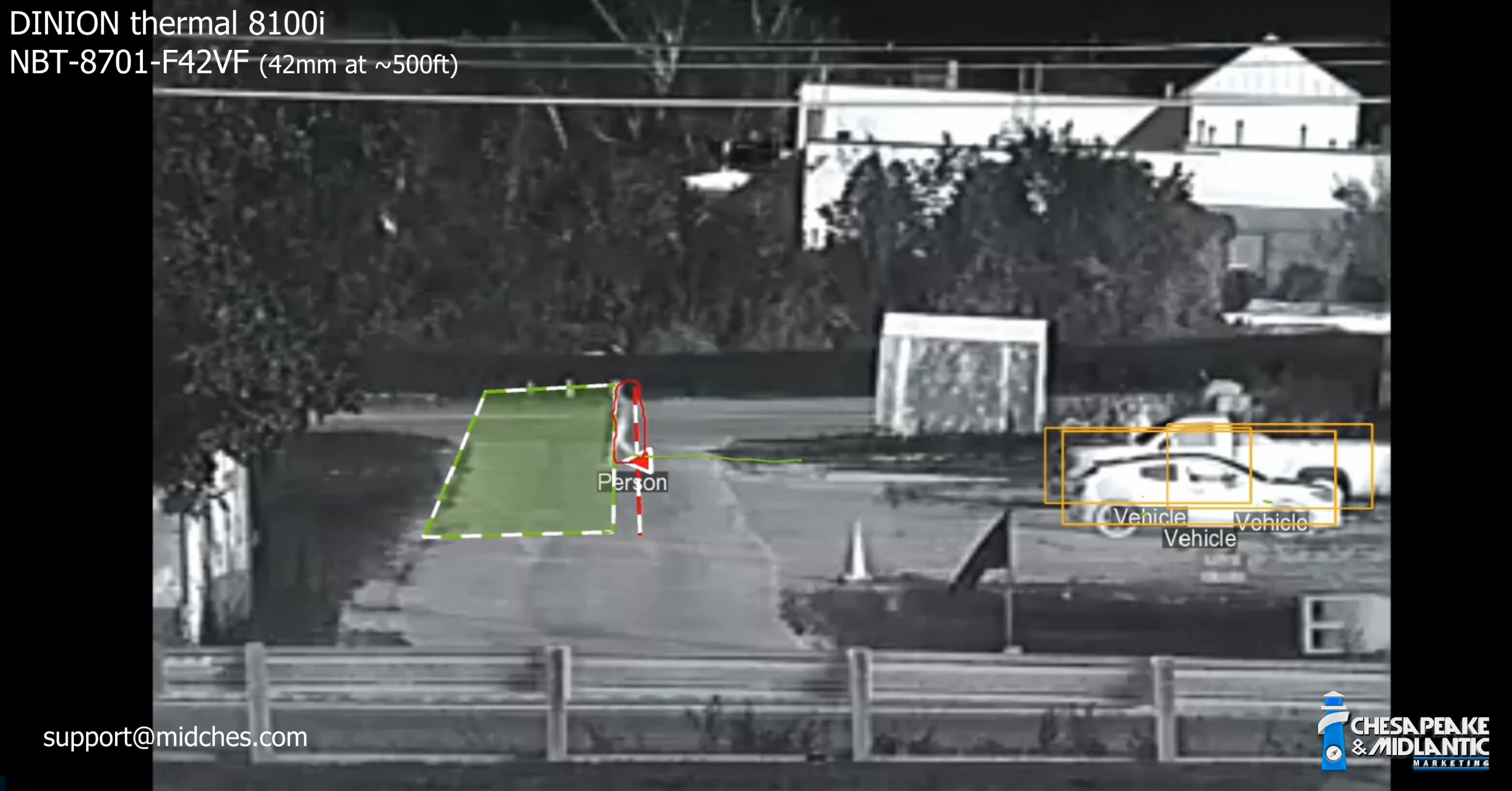
In this recent field evaluation, Steve and Brad reviewed recorded test footage from a Bosch DINION thermal 8100i NBT-8701-F42VF 42mm camera using Bosch on-camera IVA Pro Perimeter analytics. The goal was straightforward: validate whether a thermal imager with on-camera analytics can reliably detect and alarm on a person at a long standoff distance, while also preventing nuisance alarms that would distract operators in a real perimeter environment.
The test scenario confirmed two critical requirements for perimeter detection: first, that the camera and analytics could recognize and track a person at approximately 500 feet; and second, that rule logic could be configured to alarm only when a person breaches from the non secure side into the secure side, rather than alarming on routine movement within the protected area.
Test Setup
Brad opened by identifying the test platform as the DINION thermal 8100i NBT-8701-F42VF, specifically the 42 mm fixed lens version. The scene was configured as a perimeter style application with a subject, Caleb, positioned at roughly 500 feet from the camera.
The analytic overlay showed two core elements:
-
A line crossing rule with an indicated direction (arrow, violation if crossed to the left)
-
A rectangular detection area that represents the next stage of the intrusion path (violation only if the line crossing violation occurred first)
This setup was intentional. Rather than alarming on any motion in the scene, the rule required a sequence:
-
1. The person must cross the line in the specified direction, AND
-
2. The person must then enter the rectangular area, THEN
-
3. Only after both conditions occur in order should the camera generate an alarm.
This is the kind of “two-step confirmation” that perimeter designers often want, because it reduces false alarms from people moving along the fence line, activity on the secure side, or incidental motion that never becomes a real breach.
What the Analytics Was Doing at 500 Feet
Even before the alarm logic was demonstrated, Steve highlighted a key observation: at 500 feet the analytics was already classifying the subject as a person, while cars in the same scene were classified as vehicles. That matters for two reasons.
First, it indicates that IVA Pro Perimeter was not simply detecting “heat blobs.” It was tracking and classifying objects in a way that supports higher confidence rule decisions.
Second, it allows rules to be written around object classes. In many deployments, an organization wants different actions for a person versus a vehicle, and may even ignore certain object types entirely depending on the threat model and their security posture.
Demonstration of the Intended Alarm Sequence
As the playback began, Caleb crossed the line in the direction of the arrow and then entered the rectangular area. When he met the full criteria, the overlay changed to show an alarm condition. Steve and Brad called out the visual indicators that typically accompany a live alarm event:
-
The target flashes red when it meets the alarm criteria
-
The object then maintains a pink or light red outline to show it is the alarm generating object
At the same time, other detected objects in the scene (such as stationary vehicles) remained visible but did not present as alarm objects. They were shown as detected items of interest, not threats, which leads into one of the more important operational takeaways: operators can see that the system is aware of objects in the scene, but the system still visually prioritizes the object that triggered the actual event.
Direction Matters: Preventing Alarms From the Secure Side Out
Next, Caleb approached from the opposite direction, effectively simulating someone moving from the secure side outward. Based on the configured rule, this should not create an alarm, and it did not.
Steve emphasized the intent behind this configuration: many sites want to detect a breach coming into the protected area, but they do not want to alarm on normal activity on the secure side, such as personnel moving within the perimeter, guards conducting checks, or routine site operations.
In the overlay, Caleb remained yellow, indicating he was still being tracked as an object of interest, but the camera did not escalate the event to an alarm because the direction requirement was not met.
Sequence Validation: Entering the Box Without the Proper Line Crossing
A major part of the evaluation focused on proving that the order of events matters. Steve and Brad walked through several variations where Caleb moved closer to the camera and repositioned to approach the rectangular area from different angles.
The key point was that entering the rectangular area alone was not enough. The system only alarms when the line crossing occurs first (in the correct direction), followed by entry into the rectangle.
They demonstrated that when Caleb approached the rectangle without satisfying the line crossing requirement in the proper sequence, the system did not generate an alarm. This is a practical way to reduce nuisance events when someone is moving near, but not actually breaching, the perimeter boundary.
Anchor Point Configuration: Why “Feet Versus Torso” Changes Behavior
One of the more instructive portions of the discussion was about analytic “anchor points,” which determine what part of the tracked object is used to decide when a line is crossed.
In one test, Caleb’s head and shoulders crossed the line visually, but his feet did not. Because the analytics rule was configured to use the object base point (effectively the feet), the system did not treat the line as crossed and did not alarm.
Steve explained that this is configurable. Depending on the environment and the desired behavior, a site can set the rule to evaluate based on:
-
Base point (feet)
-
Object center (more aligned with the torso)
This matters in real deployments because it affects how the system behaves when a person is partially obscured, when the terrain slopes, or when the camera angle creates apparent crossings that are not true boundary violations. The evaluation showed that the base point method can be a strong choice when you want the alarm to occur only when someone truly crosses the physical boundary, not when they lean over it or pass behind a foreground feature.
Operational Takeaways for Perimeter Design
Across the scenarios, the test supported several practical conclusions for security designers and end users evaluating thermal analytics at long range:
-
Long range tracking was viable in this test, which is ideal for long fence line perimeters like at a corrections facility, nuclear plant, airport, etc.. Caleb was detected and classified as a person at approximately 500 feet using the DINION thermal 8100i with a 42 mm fixed lens.
-
Rule logic effectively reduced nuisance alarms. Directional line crossing plus a second stage area created a deliberate sequence that filtered out non breach movement.
-
Configuration details drive outcomes. Anchor point selection (base point versus center) materially changes when a crossing is considered valid.
-
Alarm visualization supports operator confidence. The system visually distinguished alarm causing objects from other detected objects in the scene, helping reduce ambiguity during live monitoring. Various video management systems (VMS) will show this differently, so be sure to request a demonstration of how alarms are handled in your software platform.
Steve and Brad’s evaluation demonstrated how a Bosch thermal camera paired with IVA Pro Perimeter can be configured for real world perimeter needs, particularly when the priority is detecting true breaches while minimizing false alarms. The combination of classification, directional line crossing, staged intrusion logic, and anchor point tuning provided a strong example of how on camera analytics can support a higher confidence perimeter alarm strategy at extended distances.
Contact the MidChes team for system design and demonstration scheduling...